We’re excited to share the newest features and enhancements available to you! Want to see these in action? Join us for the next Lytho Lowdown LIVE to explore these updates firsthand!
Your content doesn’t live in one place - and your governance shouldn’t either. This release takes Lytho further into the places where work starts and content goes out. That makes the right thing the easy thing for everyone, not just your creative team.
-
Governance in the inbox. Lytho for Outlook puts approved assets in every email. Teams using AI Reviewers can check copy and attachments against brand and compliance standards, then send anything for formal review before it goes out.
-
Context that travels with the work. Custom Fields now cover Tasks and Proofs, and there are three new field types. Details like service line, channel and audience get captured once and show up in reporting everywhere.
-
Work starts anywhere and lands in Lytho. Workflow API improvements let requests, campaigns, projects, tasks and proofs start in the tools your teams already use, and add more visibility into approvals.
-
Proof of impact. The DAM Data Warehouse sends asset activity, usage and taxonomy data to the BI tools you already use, so you can show how your content is used and the value it delivers.
The result: less manual effort, fewer off-brand surprises, and the data to prove your team’s impact.
Keep reading to explore what's new.
Features described in this article are not included in all subscription plans. Interested in expanding your feature set? Contact the Lytho Support Team for further assistance.
Integration Updates
Bring Lytho into Outlook
Available to all subscriptions
Email is one of the most common ways content is shared, but it can also introduce risks when teams rely on outdated assets, inconsistent messaging, or materials that haven't been reviewed. Lytho for Outlook brings approved content and brand governance directly into your everyday email workflow, helping teams work more efficiently without sacrificing consistency or control.
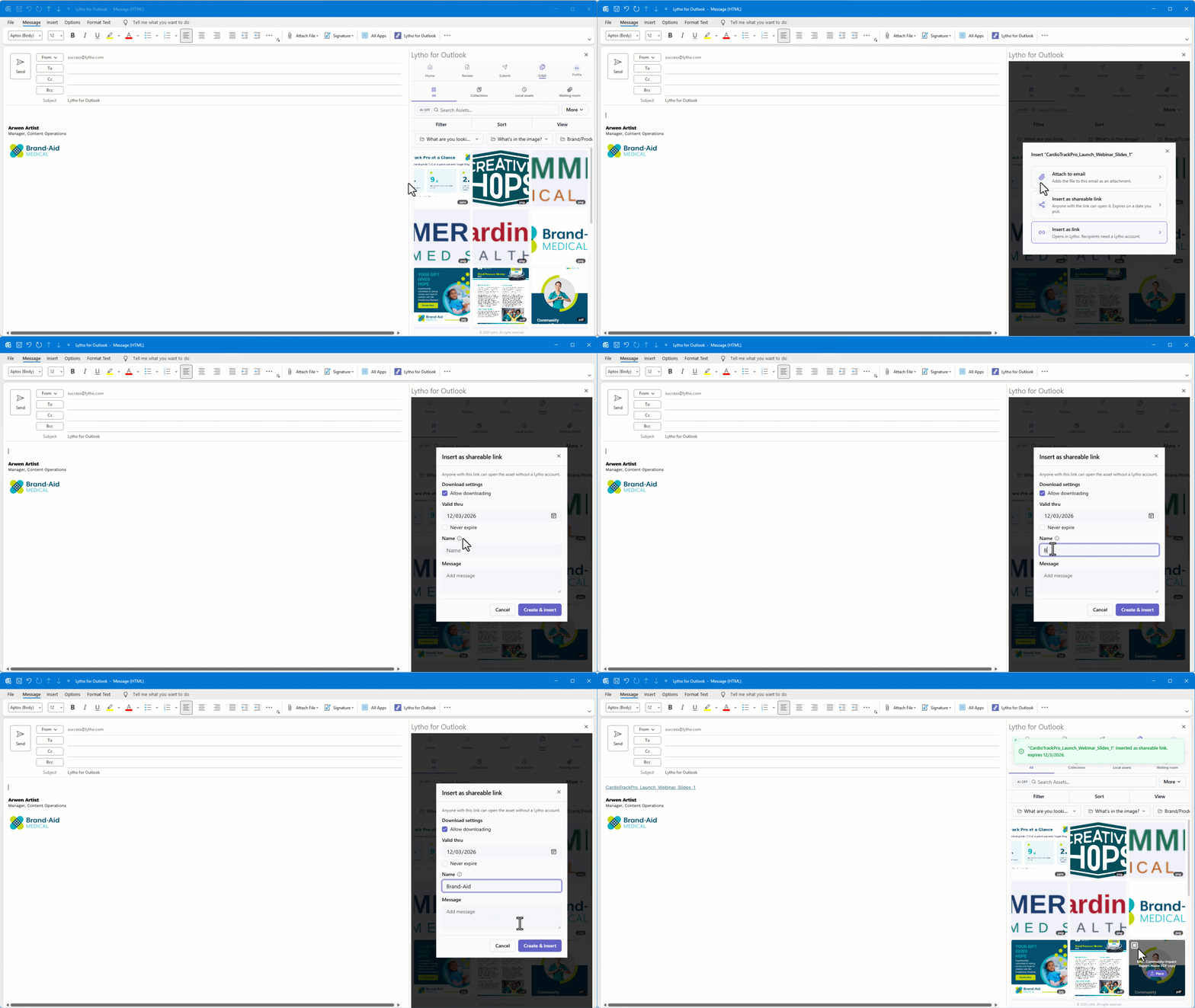
Access approved assets from your DAM without leaving Outlook, share secure links with external recipients, and easily bring files received through email back into your DAM. For teams using AI Reviewers, you can also check email text, images, and attachments against brand and compliance standards before sending. When additional approval is needed, submit an attachment directly to Lytho as a Proof for formal review.
The result? Less time switching between tools, fewer opportunities for off-brand content, and greater confidence in every communication. Add Lytho to Microsoft Outlook
Quality of Life Improvements
Workflow Updates
Custom Fields for Tasks and Proofs
Available to all subscriptions
Content teams need more than a list of projects and deadlines. They need to understand what they're creating, who it's for, where it's going, and how it supports their organization's priorities.
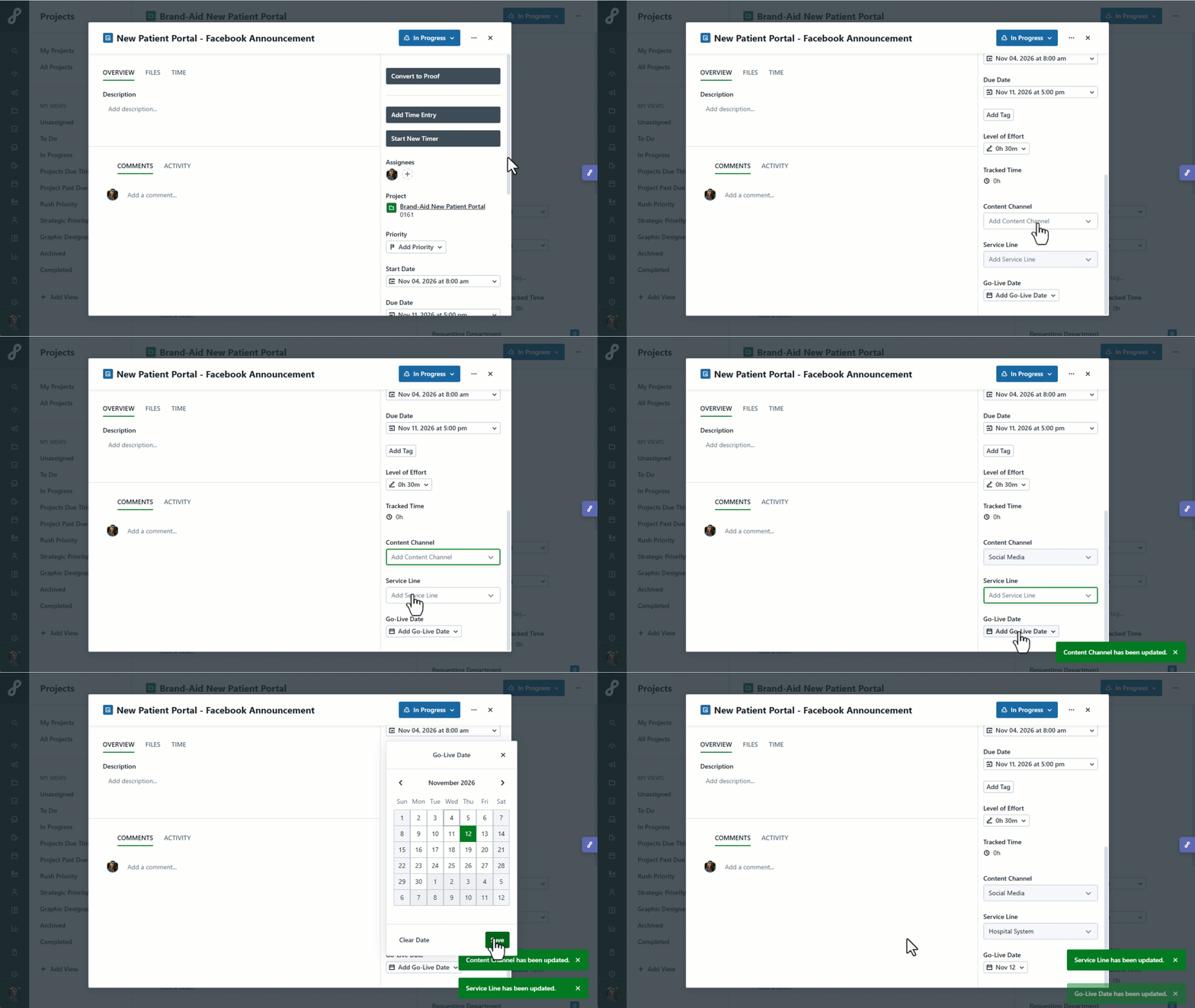
With Custom Fields now available for Tasks and Proofs, alongside Campaigns and Projects, teams can capture important details like service line, channel, audience, or content type directly where work happens. This keeps information consistent and accessible throughout the content lifecycle, reducing the need for separate trackers, manual workarounds, and repeated status updates.
We're also introducing three new Custom Field types—Rich Text Area, Multi-Select, and URL—available across Campaigns, Projects, Tasks, and Proofs. These give teams more flexibility to capture context, categorize content, and connect related resources.
This creates a more connected way to plan, create, and review content, with clearer visibility for everyone involved and more meaningful reporting on the work your team delivers.
Workflow API Improvements
Available to Business, Professional, and Enterprise packages
When work starts in another system, manually transferring information into Lytho takes time and creates opportunities for errors or missed details.
With the latest Workflow API enhancements you can now create Work Requests, Campaigns, Projects, Tasks, and Proofs directly in Lytho. This means work can begin where it makes the most sense for your team and move into Lytho without the need to re-enter information. We've also expanded access to Proof routing information, including reviewers, decisions, step statuses, and timestamps. With greater visibility into the review process, teams can strengthen accountability, simplify audit reporting, and identify opportunities to improve approval efficiency.
Additional API enhancements provide access to reporting metrics for different types of work, along with more information about comments, tags, and account settings.
Together, these improvements help your team build more connected processes and make better use of the information already captured in Lytho.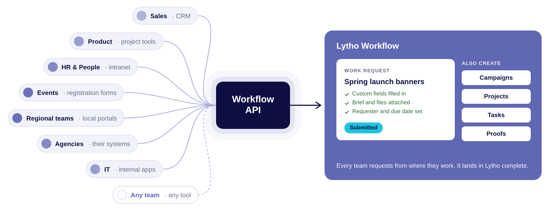
DAM Updates
Access your DAM Data in the Lytho Data Warehouse
Available to Data Warehouse add-on subscriptions. US only.
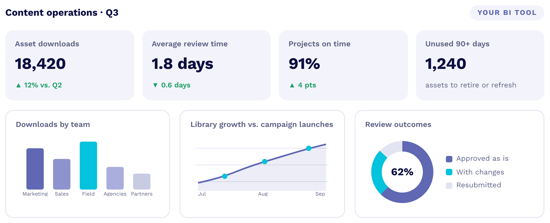
Now the Data Warehouse makes it easier to understand how content is organized, accessed, and used across your organization by bringing DAM data into the business intelligence tools you already use. Connect asset activity, usage, taxonomy, and other DAM data to tools like Power BI, Tableau, Domo, or Looker. Combine these insights with Workflow data and other business metrics to gain a more complete picture of your content operations.
With greater visibility into content usage and performance, your team can identify opportunities to improve, strengthen governance, and make more informed decisions that demonstrate the value of your work.
Add the Lytho Data Warehouse to your subscription.