
We’re excited to share the newest features and enhancements available to you! Want to see these in action? Join us for the next Lytho Lowdown LIVE to explore these updates firsthand!
This release focuses on helping teams work more efficiently — from making everyday scheduling more flexible, to accelerating AI-powered asset management, to expanding API capabilities for deeper integrations. Whether you're managing creative workflows, organizing digital assets, or building custom integrations, these updates reduce manual effort and give your team greater control over how work gets done.
Keep reading to explore what’s new.
Features described in this article are not included in all subscription plans. Interested in expanding your feature set? Contact the Lytho Support Team for further assistance.
Workflow Updates
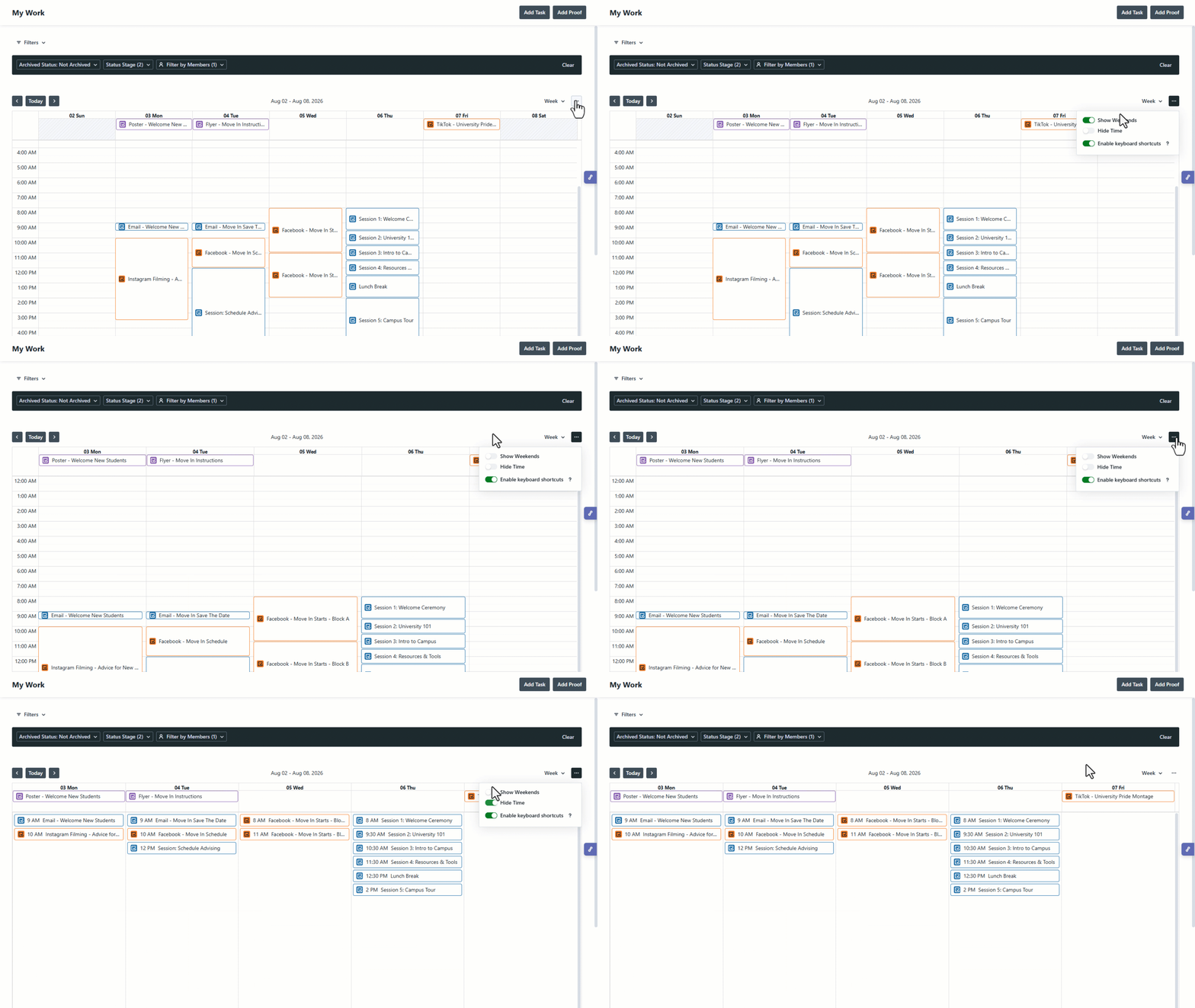
Enhanced Calendar Views & Scheduling
New Calendar enhancements give you greater flexibility to tailor your planning experience and stay focused on the work that matters most.
Exclude Weekends
Hide weekends from Calendar views for a cleaner view of your workweek and more focused planning.
Simplified Week View
Reduce visual clutter by removing hourly time slots from the Week View, making it easier to focus on scheduled work.
Keyboard Shortcuts
Navigate and work faster with new keyboard shortcuts throughout Calendar views, helping users move efficiently without relying on the mouse.
Lytho Workflow API
We've expanded the Lytho Workflow API with new endpoints and enhanced existing ones, making it easier to build integrations, automate business processes, and access more of your workflow data programmatically. The updated API now lets you:
-
Search work requests by submitter, status, and date range to retrieve the exact work you need.
-
Access request form fields and search using custom fields to support organization-specific workflows.
-
Retrieve all tasks for a project from a dedicated endpoint, simplifying project-level integrations.
-
Access custom fields and custom statuses for projects and campaigns, including through search results.
-
Search tasks by status and retrieve expanded task details.
-
Work with richer proofing data, including proof status, version number, sent date, cancellation date, completion date, and status updates.
-
Leverage new first-class Proof and Work Item Status Category entities for more robust integrations and reporting.
Together, these enhancements make it easier to build custom integrations, automate workflows, and connect Lytho Workflow with the systems your team relies on every day.
Bulk AI Alt Text and Description Generation
Generate alt text and descriptions for multiple image assets in a single action. Automatically create metadata aligned with WCAG 2.2 AA accessibility standards to improve accessibility, enrich asset context, support governance, and reduce the manual effort required to create descriptive, compliant metadata.

Alt Text Included in Embed Links
Alt text now travels with embedded assets. When assets are shared outside of the Lytho DAM using embed links, their associated alt text is included automatically, helping improve accessibility and maintain metadata wherever your assets are published.

Lytho DAM API
We've significantly upgraded the Lytho DAM API so customers and their integration partners can find and manage assets programmatically in far more powerful ways. The improved API now lets you:
-
Search in a single call that combines collections, tags, keywords, and custom fields — no more stacking multiple requests and filtering on your side.
-
Filter by your own custom fields so the API works with the metadata taxonomy your team already uses.
-
Search by tags, collections, and file type, with richer metadata returned in each response.
-
Work with asset relationships — retrieve an asset's variants, versions, and related assets (so a website or CMS can serve the right one).
-
Run bulk operations — batch metadata updates and bulk tagging for large libraries and migrations.
-
Make safe partial updates (PATCH) — change one field without overwriting the rest of the record.
-
Page and sort large libraries efficiently with larger page sizes, cursor-based pagination, and sorting.
Together, these make Lytho a stronger fit for website/CMS integrations, automation, and large-scale asset management.