We’re excited to share the newest features and enhancements available to you! Want to see these in action? Join us for the next Lytho Lowdown LIVE to explore these updates firsthand!
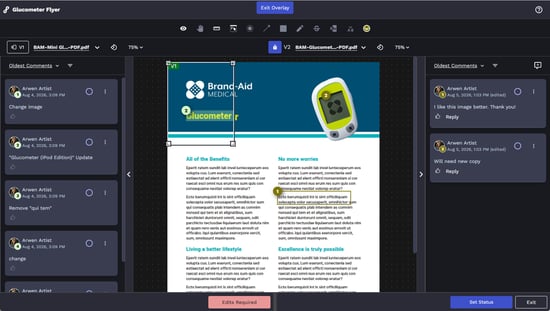
This month's release introduces new ways to make content creation, review, and approval more efficient and intuitive. We've added greater flexibility to approval workflows with customizable Approval Statuses, introduced a new overlay mode to compare Review versions, and launched the Lytho Canva Integration, bringing Lytho directly into the Canva creative process.
Together, these updates help teams reduce review effort, strengthen content governance, and move work from creation to approval faster.
Keep reading to explore what’s new.
Features described in this article are not included in all subscription plans. Interested in expanding your feature set? Contact the Lytho Support Team for further assistance.
Workflow Updates
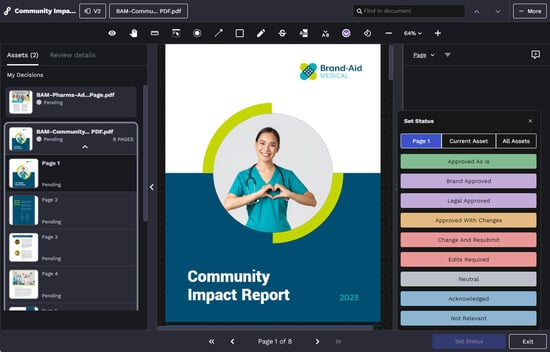
Custom Approval Statuses in Reviews
You can now customize approval statuses in Reviews to match your team's actual process. Instead of generic stages, set up statuses that reflect how your organization really makes decisions, creating a clearer audit trail, more consistent workflows, and stronger content governance across every review.
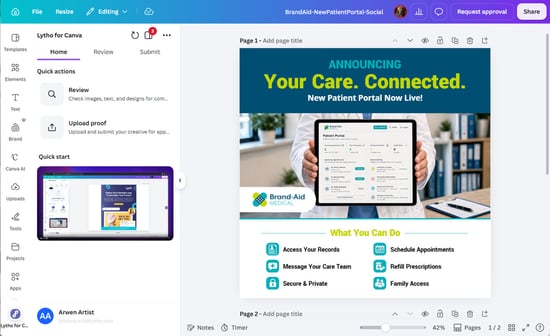
Lytho Canva Integration
The Lytho Canva Integration brings Lytho directly into Canva, helping teams bring brand and compliance checks into the creative process from the start.
Team members and stakeholders can use AI-powered reviewers to validate brand consistency and compliance in real time. If human review is needed, team members can submit the asset directly to Lytho.
The result is fewer interruptions, less rework, and stronger content governance from creation through final approval.
Install the Lytho Canva Integration here.
Version Overlay Comparison (Beta)
We've introduced Version Overlay Comparison as a beta feature, providing Reviewers with an additional way to compare two versions of a Proof. The overlay makes it easier to inspect revisions and verify changes during the Review process, helping teams review content with greater confidence.