
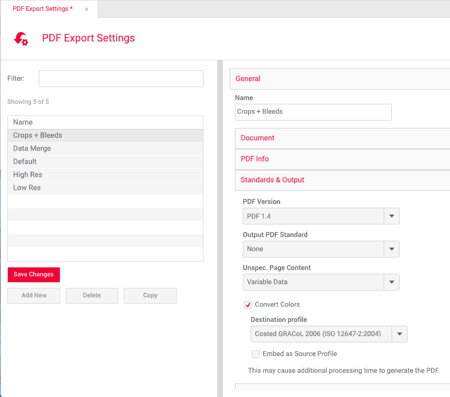
To set the color space of PDFs from Tempo, turn on Convert Colors in the CHILI PDF Export Settings the template uses, and pick a destination profile in the color space you need: a CMYK profile for CMYK output, or an RGB profile for RGB output.
Set up the export color space
Work on a copy of the export settings.
The setting lives in the Backoffice at Settings › PDF Export Settings › Standards & Output › Convert Colors.
-
Find the current settings. In the CHILI back office, open PDF Export Settings and locate the settings the template's PDF output uses now.Duplicate them. Make a copy and give it a clear name, for example <Output name> – CMYK or <Output name> – RGB.
-
Open Standards and Output. In the copy, go to the Standards and Output section.
-
Turn on Convert Colors. Check Convert Colors. A dropdown of destination profiles appears.
-
Pick a destination profile. Choose a CMYK or RGB profile, depending on the output you need (see the next section). Save the settings.
-
Test the copy. Export a PDF from the template with a DAM image placed, using the new settings, and confirm it's in the color space you chose.
-
Make it live. Once the test passes, link the new export settings to the template's PDF output in Tempo, in place of the old ones.
-
Export again from Tempo as an end user would, and re-check one PDF to confirm the live path uses the new settings.
Choosing a destination profile
Coated GRACoL 2006 (ISO 12647-2:2004) is a good default for CMYK. sRGB IEC61966-2.1 is a good default for RGB.
|
# |
Destination profile (as listed) |
Color space |
Intended use |
|
1 |
Adobe RGB (1998) |
RGB |
Wide-gamut RGB |
|
2 |
Apple RGB |
RGB |
Older Mac display RGB |
|
3 |
Coated FOGRA27 (ISO 12647-2:2004) |
CMYK |
European sheetfed, coated paper |
|
4 |
Coated FOGRA39 (ISO 12647-2:2004) |
CMYK |
European sheetfed, coated paper |
|
5 |
Coated GRACoL 2006 (ISO 12647-2:2004) |
CMYK |
US sheetfed, coated paper |
|
6 |
ColorMatch RGB |
RGB |
Prepress RGB |
|
7 |
ISO Coated v2 - GREY 1c - (basICColor) |
Grayscale |
Single-color (black) on coated paper |
|
8 |
Japan Color 2001 Coated |
CMYK |
Japan, coated paper |
|
9 |
Japan Color 2001 Uncoated |
CMYK |
Japan, uncoated paper |
|
10 |
Japan Color 2002 Newspaper |
CMYK |
Japan, newsprint |
|
11 |
Japan Color 2003 Web Coated |
CMYK |
Japan, web offset coated |
|
12 |
Japan Web Coated (Ad) |
CMYK |
Japan, web coated for ads |
|
13 |
ProPhoto RGB |
RGB |
Very wide-gamut photo RGB |
|
14 |
sRGB IEC61966-2.1 |
RGB |
Standard screen/web RGB |
|
15 |
Uncoated FOGRA29 (ISO 12647-2:2004) |
CMYK |
European, uncoated paper |
|
16 |
US Newsprint (SNAP 2007) |
CMYK |
US newspaper |
|
17 |
U.S. Sheetfed Coated v2 |
CMYK |
US sheetfed, coated paper |
|
18 |
U.S. Sheetfed Uncoated v2 |
CMYK |
US sheetfed, uncoated paper |
|
19 |
U.S. Web Coated (SWOP) v2 |
CMYK |
US web offset, coated paper |
|
20 |
U.S. Web Uncoated v2 |
CMYK |
US web offset, uncoated paper |
|
21 |
Web Coated FOGRA28 (ISO 12647-2:2004) |
CMYK |
European web offset, coated paper |
|
22 |
Web Coated SWOP 2006 Grade 3 Paper |
CMYK |
US web offset, grade 3 paper |
|
23 |
Web Coated SWOP 2006 Grade 5 Paper |
CMYK |
US web offset, grade 5 paper |