Skip to content
English - United States
  • There are no suggestions because the search field is empty.

Getting Started with the DAM API


Lytho's API enables developers to build applications with access to Lytho's Asset Management and statistics dashboard. This enables users to fully integrate Lytho in their workflow and processes. Use the documentation below to get started:


TABLE OF CONTENTS
• Using Lytho API

• API Requests 

• Technical Documentation

• Use Cases Examples

• Error Handling 


Using Lytho API

Lytho API allows developers to request information from Lytho including Assets, Collections, Tags, Tag groups and Permissions.

Authentication

Every HTTP request made to Lytho API must be authenticated by Lytho. Lytho supports API keys to be able to authenticate and use the Lytho API. 

Creating API Access Keys

To integrate Lytho DAM with your website or other applications, you'll first need to generate an API access key.

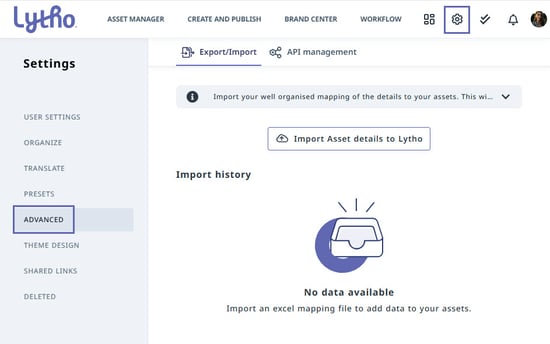
Select the Settings icon in the upper-right corner of the navigation bar. From the left navigation panel, select ADVANCED.
DAM Advanced Panel

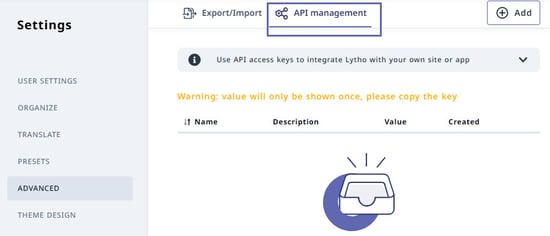
Select API management.
DAM API Management


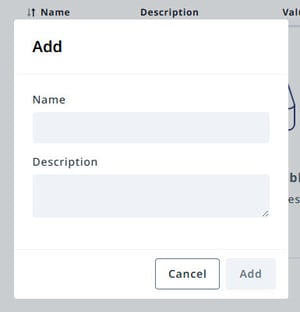
Select Add to create a new API access key. Enter a Name and Description for the key, then select Add.
Add API Access Key

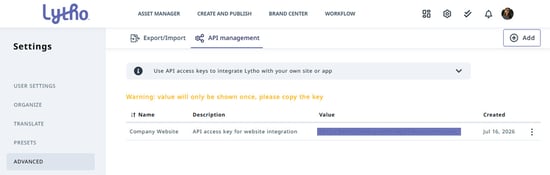
Your new API access key will appear in the API Management list, displaying its Name, Description, Value, and Created Date. Multiple API access keys can be created and will be bound to your specific Lytho tenant.
DAM-AccessKey-7-16-26

Important: Copy and securely store the Value (your API access key) immediately after it is created. For security reasons, the key value is displayed only once. After you leave or refresh the page, the value can no longer be viewed. If the key is lost, you'll need to generate a new one.


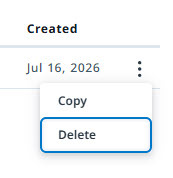
An API access key can always be revoked at any time by selecting the ... menu on the right of the access key line item, and then Delete.

Delete Access Key


API Requests

All API requests must be made over HTTPS. The URL for the request varies depending on the region your account is located in and the resources being accessed. See our detailed API documentation for exact URLs.

Pagination

Pagination of Lytho API is the process of organizing the response results of an API call into multiple pages. When you do GET calls especially bulk requests using the GET API methods there is a high possibility of a large number of records being returned. To make handling large payloads easier, we provide you with a way to control the maximum number of responses through pagination. 

Every call that is capable of using pagination can be given the following two request parameters: 

  • Page, the page parameter contains the page you want to retrieve

  • Size, the size parameter contains the number of records a single page will contain its defaulted to 20 and has a maximum of 50

Update and remove data

Currently all API calls expect a complete object to be send back to update, if a field in the object is not present in the json the field will be removed and become an empty field within Lytho. At this moment partial updates are not possible.


Technical Documentation

You can find the technical documentation for Lytho DAM's API here.


Use Cases Examples

File Storage & Cloud Platforms (Google Drive, Dropbox, OneDrive, Box)
Synchronize assets between cloud storage and Lytho DAM, automate uploads, preserve version history, and centralize approved content.

Creative & Design Applications (Adobe Creative Cloud, Figma, Canva)
Retrieve approved assets directly within design tools and automatically publish completed creative back to Lytho DAM with metadata applied.

Project & Work Management (Jira, Asana, Monday.com, Smartsheet)
Connect approved assets to projects, automatically upload final deliverables, and keep creative work and asset libraries synchronized.

CMS & Digital Experience Platforms (WordPress, Drupal, Sitecore, Kentico)
Publish approved assets directly to websites and digital experiences while maintaining centralized governance and version control.

Sales & CRM Platforms (Salesforce, HubSpot, Zoho CRM)
Provide sales teams with instant access to the latest approved collateral and automatically associate assets with campaigns, opportunities, or customer records.

Communications & Collaboration (Slack, Microsoft Teams)
Notify users when assets are uploaded, approved, updated, or expire, and automatically share asset links with teams.

Business Intelligence & Analytics (Power BI, Tableau, Domo)
Analyze asset usage, metadata, downloads, lifecycle activity, and DAM adoption to measure asset performance and ROI.

Knowledge Management & Customer Support (Confluence, Zendesk, ServiceNow)
Embed approved brand assets into documentation, knowledge bases, and support workflows so teams always access the latest content.

Marketing Automation & Content Delivery (HubSpot, Marketo, Pardot)
Retrieve approved assets for marketing campaigns, automate content distribution, and maintain consistent branding across channels.

Custom Applications & Portals (Internal websites, partner portals, mobile apps)
Build branded experiences that search, retrieve, display, or distribute assets directly from Lytho DAM using secure API access.


Error Handling

The Lytho API uses HTTP status codes to reflect a successful or unsuccessful request. 2XX status codes are successful requests 4XX/5XX status codes represent an error took place. If you receive an error status code, check the body for an error code and message.


Status code
Description Most likely cause
2XX Successful request  
400 Bad request Invalid / missing data
401 Unauthorized Invalid / missing API key
403 Forbidden Performing an action that's not permitted
404 Not found

The resource doesn’t exist / wrong

endpoint

409 Conflict

Trying to overwrite a resource that

already exists

429 Too many requests Hit an API rate limit
500 Internal server error An error occurred on Lytho side


Rate Limits define the maximum number of requests that can be made by apps to the Lytho API in a given period of time. Lytho employs rate limits to ensure stability of the API service for all users and to prevent many types of abuse or inadvertent

usage. Cache responses whenever possible instead of frequently making the same request.

• 20 requests / minute

• and a daily rate limit of 30000 request / day


(these are the base rate limits; if needed we can look into specific requests for rate limit settings)