
If you’ve ever worked on multiple design templates, you’ve probably noticed that a lot of them share the same variables — like a headline, body text, a call-to-action button, a URL, an image linked to your DAM, or list variables with action logic. Instead of setting these up from scratch every time, you can copy them from an existing template.
TABLE OF CONTENTS
• Apply Copied Variables to Your Document
Copying Variables
1. In your CHILI BackOffice, single click on the design where you want to add the variables. This will be the one that doesn’t have any variables assigned yet.
2. In the right-hand panel that pops up, navigate to the Variables dropdown.
3. Click the Import From Doc button. 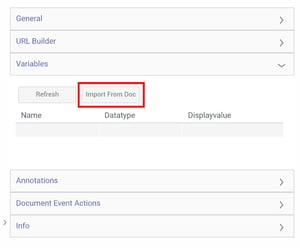
4. In the Import Variables box, click the Select… button.
5. Navigate to the folder that contains the document with your existing variables.
6. Select the file that contains the variables you want to copy and click Ok. 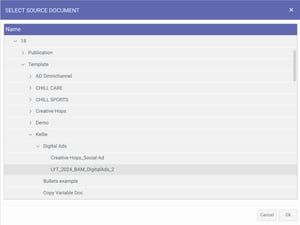
7. Once you have done this, you’ll see your new list of variables in the right-hand panel.
Apply Copied Variables to Your Document
Now that your variables are successfully copied to your new document, you can assign them to your artwork frames. When you begin editing your new document and open your left-hand Variable tab, you'll notice the preview text for the text variables copied over from your existing document. In some instances, you may want to update your preview text – you can safely do that without affecting any of your other documents. You can also remove any unnecessary variables, change the variable type, and link your new image variables.
Now that all your copied variables have been created, updated, and assigned to fit your new document, simply complete creating and assigning any new variables just as you would with any of your other documents.
Need help building your Tempo templates?
Dream big. Let our experts bring it to life. Lytho's Professional Templating Services make it easy to scale high-quality, on-brand templates without burdening your internal design team. You provide the content, and we'll handle the complexity. Have a project in mind or want to learn more? Contact our team.