DivvyHQ includes a variety of messaging and notification options when collaborating on a content project.
Option 1: Add a general comment
Within Divvy's new content sandbox, a general comment can be added using the comments panel in the right column. This will trigger a notification for all team members that are assigned to the content item.
Each user has the ability to adjust their notification preferences within their My Profile area, so you might want to make sure that your team enables this particular notification (email notification when a comment is added).
Option 2: @tagging
When leaving a comment in the comments panel, typing the @ symbol will allow you to select from a list of team members and this will trigger a direct notification to those users you've "tagged". You can tag one or multiple users.
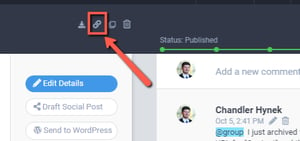
Option 3: "Copy URL to Clipboard" and send it to a Team Member
If you want to bypass the comments function and just send a link to a team member, then use our Copy URL to Clipboard function and send a direct message or email to whomever you choose.