This article is designed for quick lookups and reminders after you've learned the basics of Action Logic. For step-by-step tutorials, check out our in-depth articles or videos.
TABLE OF CONTENTS
• Switching Layouts Based on Dropdown Menu Selection

This article is designed for quick lookups and reminders after you've learned the basics of Action Logic. For step-by-step tutorials, check out our in-depth articles or videos.
TABLE OF CONTENTS
• Switching Layouts Based on Dropdown Menu Selection
Switching Layouts Based on Dropdown Menu Selection
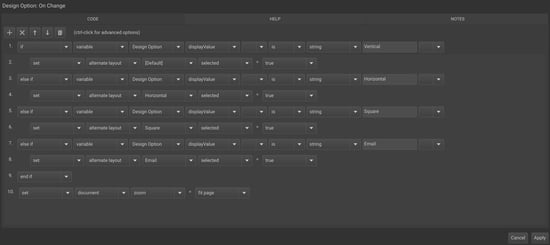
Problem to solve: Enable stakeholders to select different layouts from a dropdown menu.
Steps:
1. Create your Alternate Layouts and name them (ex: Vertical, Horizontal).
2. Add a List variable for your layout selector (ex: "Design Option ").
3. Add Action Logic to set the selected layout based on the variable’s value.
Sample Action Logic:
If variable [Design Option] displayValue is string "Vertical"
→ set alternate layout [Default] selected = true
else if variable [Design Option] displayValue is string "Horizontal"
→ set alternate layout [Horizontal] selected = true
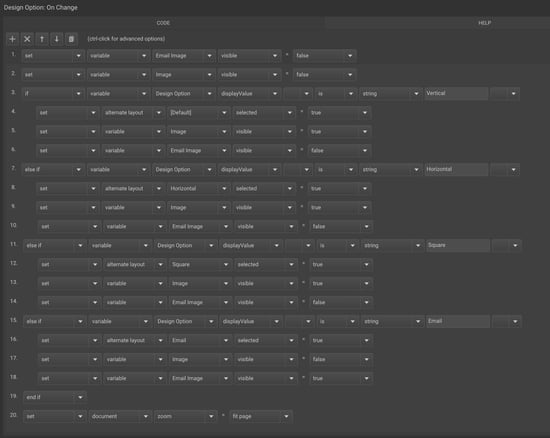
Problem to solve: Show only relevant variables based on the selected layout.
Steps:
1. Set visibility of all layout-specific variables to false by default.
2. Add Action Logic to show variables for the selected layout.
Sample Action Logic:
set variable [Email Image] visible = false
set variable [Image] visible = false
If variable [Design Option] displayValue is string "Email"
→ set variable [Email Image] visible = false
set variable [Image] visible = false
Changing Text Color with a Dropdown
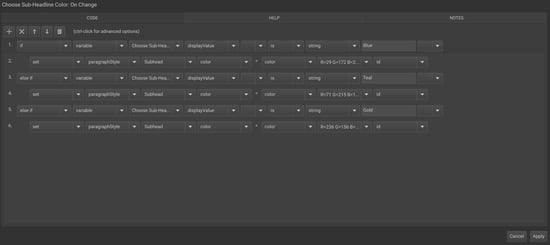
Problem to solve: Allow stakeholders to change text color while maintaining consistent fonts and styles.
Steps:
1. Set up Paragraph Styles and Color Swatches.
2. Create a "List" variable for your color options (ex: "Choose Text Color").
3. Add Action Logic to change the text color based on selection.
Sample Action Logic:
If variable [Choose Sub-Headline Color] displayValue is string "Blue"
→ set paragraphStyle [Subhead] color = color [R=29 G172 B211 2] id
Else if variable [Choose Sub-Headline Color] displayValue is string "Teal"
→ set paragraphStyle [Subhead] color = color [R=71 G=215 B=172]
Dream big. Let our experts bring it to life. Lytho's Professional Templating Services make it easy to scale high-quality, on-brand templates without burdening your internal design team. You provide the content, and we'll handle the complexity. Have a project in mind or want to learn more? Contact our team.